Category: Local SEO & Marketing

  • How Fast Does Local SEO Work? I Got a Houston Business to Page One in Two Weeks

    A real local SEO case study: how I got a Houston business onto page one of Google in two weeks, and why it kept ranking five months later.

    Most Houston businesses don’t have a Google problem… they have a local SEO problem.

    I worked with a local liquor store that was basically invisible online. No real website. A Google Business Profile that had been lost track of. Nothing telling Google who they were, what they sold, or where to find them. If you searched for what they offered, they just weren’t there.

    So we fixed the foundation. All of it, in the first month.

    I reclaimed their Google Business Profile and got it verified again. Then I optimized it properly… correct categories, accurate info, the details Google actually looks at. I built them a real website. I set up Google Search Console and got the site submitted and indexed so Google could actually see it. And I targeted the keywords their real customers were typing in, not the vague stuff, the searches that bring people through the door.

    Two weeks in, they hit page one.

    That part still surprises people. Two weeks. But it wasn’t luck… it was just the result of getting the basics right when nobody had bothered to before. When the foundation is missing, fixing it moves the needle fast.

    Here’s the part that matters more though.

    Why the Local SEO Foundation Matters More Than the Speed

    I did that work in the first month. Then the engagement ended. I never went back in, never touched it again, never added anything.

    Five months later, it’s still working.

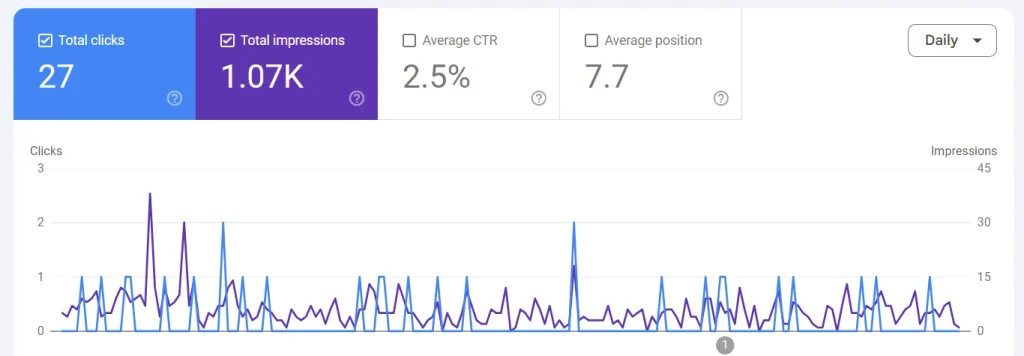
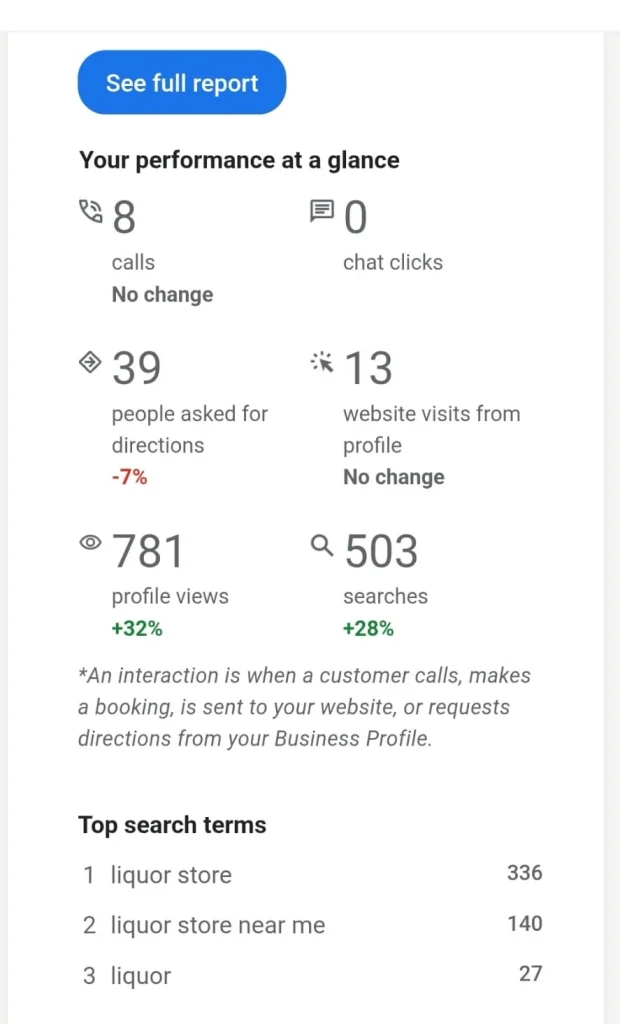
    Combined, the site has pulled around 2,500 impressions and 44 clicks since then, holding an average position on page one of Google the entire time. No maintenance. No new content. No ongoing spend. Just the foundation, still doing its job months after the work was done.

    That’s the thing most people miss about local SEO. It’s not a faucet you have to keep paying to leave running. Done right, it’s more like planting something. You do the work once, properly, and it keeps producing long after you’ve stepped away.

    Now imagine what that looks like with someone actually staying in it month over month… refining, expanding, building on a foundation that already holds on its own.

    That’s the part we didn’t even get to.

    If your business is invisible when customers search… that’s not a forever problem. It’s usually just a foundation that was never built. And that’s exactly the kind of local SEO work I do for Houston businesses.

    Related: How Long Does Local SEO Take To Work?

    ← Back To Blog

  • How to Use AI for SEO (Without Hurting Your Rankings)

    Everyone’s talking about AI right now and how to properly use it without hurting your rankings. How it’s going to change everything, make content creation effortless, automate all your marketing… and honestly, some of that is true. But most of what you hear is noise.

    Here’s what I tell the business owners I work with: AI isn’t a replacement for knowing what you’re doing. It’s a tool. A really useful tool, but still just a tool. One way people are starting to boost their site traffic is by using AI as an assistant, not taking shortcuts.

    The difference matters more than you think.

    Related: How To Boost Site Traffic

    Can AI Content Actually Hurt Your SEO?

    Let’s get this out of the way. Yes, AI can hurt your rankings… but not for the reason you might think.

    Google doesn’t care if you used AI to write something. What they care about is whether your content is actually helpful. They’re looking for experience, expertise, and whether people can trust what you’re saying. If your content checks those boxes, it doesn’t matter how you created it.

    Where people mess up is treating AI like a content factory. They pump out dozens of blog posts with barely any editing, no fact-checking, nothing that shows they actually know what they’re talking about. That stuff gets filtered out, not because it’s AI-generated, but because it’s unhelpful.

    I’ve seen it happen. Someone gets excited about how fast they can create content, and six months later they’re wondering why their traffic didn’t move. The answer is usually sitting right there in what they published.

    How You Should Actually Be Using AI

    Think of AI as a research assistant. It can help you organize information, spot patterns, brainstorm ideas… but it can’t replace your judgment. You’re still the one who knows if something is accurate, relevant, or worth saying.

    That human piece is what makes content rank. Google wants to show people content from someone who actually knows the subject. AI can help you communicate what you know more efficiently, but it can’t create expertise where there isn’t any.

    Related: Free Marketing With SEO Strategies

    Where AI Actually Helps

    Keyword Research

    AI is good at finding long-tail keywords and related questions you might not have thought of. It can group keywords by what people are actually looking for, which saves time. But here’s the thing… just because AI suggests a keyword doesn’t mean you should use it. You still need to decide what’s actually relevant to your business.

    Content Structure

    AI can help you see what a complete article should cover. It’ll point out sections you might have missed or areas where your flow is confusing. This is useful for building depth on a topic, which matters for SEO. But you’re still the one deciding what your audience needs to know and in what order.

    Updating Old Content

    This is where I use AI the most. Taking older blog posts and refreshing them with current information, clarifying sections that aren’t clear, improving how they read. Updating what you already have is often more valuable than creating something new, and AI makes it faster.

    Meta Descriptions and Titles

    AI can help you write better meta titles and descriptions, test different versions, keep everything within character limits. This doesn’t directly affect rankings, but it affects whether people click on your result. Low risk, high value.

    Internal Linking

    AI can find opportunities to link your articles together in ways that make sense. Building these content clusters helps search engines understand what you’re about. Instead of manually checking every post, AI can suggest connections based on topic overlap.

    What AI Shouldn’t Be Doing

    Don’t let AI write full articles without you adding real input. The results will be generic and missing the perspective that makes your content worth reading.

    Don’t publish anything without reviewing it. Even if it looks good at first glance, you need to fact-check and make sure it actually helps your audience.

    Don’t chase keywords that don’t align with what you offer or what your audience needs. And definitely don’t try to automate your entire SEO strategy. Tools only work if there’s a real plan behind them.

    If You’re Handling This Yourself

    For small business owners doing their own marketing, AI levels the playing field. You can do keyword research, optimize content, improve your site structure without needing a full team or a huge budget.

    That said, there are times when getting help makes sense. If you’re in a competitive space, if you’ve been trying for months without seeing results, or if you just don’t have the time to stay on top of this… talking to someone who does this every day can give you clarity that AI can’t.

    Either way, AI should fit into a longer plan. It’s not a quick fix. It’s something that makes consistent effort more efficient.

    Want help building a content strategy that actually works for your business? Our SEO Foundation program includes strategy, content planning, and ongoing optimization.

    The Real Story

    AI can make you faster. But it can’t make you better unless you’re already bringing something valuable to the conversation. Content that shows real expertise and answers actual questions will always beat mass-produced filler.

    Focus on consistency over shortcuts. Building organic traffic takes time, and no AI tool changes that. What it can do is help you make the most of the time you put in.

    If you’re serious about improving your SEO, start by figuring out what’s already working and what isn’t. A content audit will show you where your biggest opportunities are. From there, you can build something sustainable, whether you handle it yourself with AI as backup or bring someone in to guide the process.

    If you want to talk through what makes sense for your situation, I’m around.

    ← Back To Blog

  • Content Strategy vs Content Marketing: What’s the Difference?

    Content strategy vs content marketing gets thrown around like they’re the same thing. They’re not.

    I see this confusion all the time when talking to business owners. Someone tells them they need “content marketing” so they start posting on Instagram three times a week. A few months later, they’re burnt out, their engagement is flat, and they’re wondering what went wrong.

    The problem? They jumped straight into creating content without ever building a strategy first.

    Related: A Content Strategy You Can Maintain

    The Real Difference Between Content Strategy Vs Content Marketing

    Content strategy is the plan. Content marketing is the execution.

    Think about it like building a house. Content strategy is the blueprint… the foundation, the measurements, the decisions about where rooms go and why. Content marketing is the actual construction… the hammering, the painting, the work that people can see.

    You can have a content strategy without doing content marketing. That’s just planning and never executing. Not ideal, but at least you know where you’re going.

    But content marketing without a content strategy? That’s just posting random stuff and hoping something sticks. And hope isn’t a strategy.

    What Content Strategy Actually Covers

    Content strategy answers the big questions before you ever create a single post or write a single blog.

    Who are you talking to? What do they actually need from you? Where are they hanging out online? What’s the point of all this… are you trying to build trust, get leads, make sales, or something else entirely?

    It also covers the stuff most people ignore. Like how you’re going to stay consistent when life gets busy. How you’ll measure if any of this is working. What happens when someone actually engages with your content… then what?

    A good content strategy also thinks about the user experience. How does someone move from discovering you to trusting you to eventually buying from you? What content exists at each stage of that journey?

    Without answering these questions first, you’re just creating content in a vacuum.

    Related: How To Build A Content Strategy

    What Content Marketing Represents

    Content marketing is everything you do to execute that strategy.

    It’s the blog posts, the social media, the videos, the emails, the podcasts… whatever format you choose. It’s the actual creation and distribution of content that attracts, engages, and converts your audience.

    This is where most people live because it’s tangible. You can see a post go up. You can count likes and comments. It feels productive.

    And it is productive… but only if it’s connected to a strategy that makes sense for your business.

    I’ve watched people create incredible content that goes nowhere because they never figured out who they were making it for or what they wanted it to accomplish. Beautiful Instagram grids with zero sales. Thoughtful blog posts that no one finds because there’s no SEO strategy behind them.

    Content marketing without strategy is just noise.

    Why Most People Skip the Strategy Part

    Strategy feels like extra work. It doesn’t give you that instant dopamine hit of posting something and getting a few likes.

    Also, it requires you to make decisions. About your audience, your offer, your positioning. And making those decisions means committing to something, which can feel scary when you’re still figuring things out.

    So people skip it. They go straight to tactics because tactics feel safer. Someone says “post Reels” so they post Reels. Someone says “start a blog” so they start a blog.

    But without strategy guiding those tactics, you’re just copying what other people are doing and hoping it works for you too.

    How Strategy & Marketing Work Together Within Content

    Here’s what it looks like when content strategy and content marketing actually work together.

    Your strategy says: “I’m targeting small business owners who are overwhelmed by marketing. My goal is to build trust and get them on a discovery call. I’ll focus on educational content that solves small problems and demonstrates expertise.”

    Your content marketing says: “Based on that strategy, I’ll publish one blog post per week answering common SEO questions. I’ll share snippets of those posts on LinkedIn where my audience already hangs out. Each post will end with a soft invitation to book a call if they want help implementing.”

    See the difference? The strategy gave you direction. The marketing gave you action steps that actually align with that direction.

    What This Means for Your Business

    If you’ve been creating content and feeling like it’s not going anywhere, the problem probably isn’t your content. It’s that you never built the strategy underneath it.

    You don’t need to create more. You need to create smarter.

    Start with the strategy questions. Who, what, where, why. Then let those answers guide what you actually make and share.

    And if you realize you’ve been doing content marketing without a real strategy? It’s not too late to pause and build one now. Your future self will thank you for it.

    Want help building a content strategy that actually works for your business? Our SEO Foundation program includes strategy, content planning, and ongoing optimization.

    ← Back To Blog

  • How to Design a Landing Page That Actually Converts

    When I first landed in Thailand, I didn’t have much. Laptop, camera, and a list of things I needed to rebuild from scratch. One of those things was my whole marketing system. I needed something simple enough to run from a cafe in Pattaya, but strong enough to actually bring in clients.

    That’s when I learned the hard truth about landing pages… most of them don’t work because they’re trying to do too much.

    Related: Why Pretty Websites Don’t Sell

    The Problem with Most Landing Page Designs

    You’ve probably seen them. Hell, you might’ve even built one. Landing pages packed with information, five different call-to-action buttons, image sliders, testimonials scattered everywhere, and a paragraph trying to explain every single thing you offer.

    I built pages like that too when I started. I thought I needed to impress people. Show them everything I could do. Prove I was legit.

    Then I looked at the analytics. People weren’t staying long enough to read any of it. They’d land on the page and bounce. Not because the offer was bad… because they couldn’t figure out what I was asking them to do.

    That’s when I stripped everything down and started building minimalist landing pages. Not because it looked cool. Because it actually worked.

    How to Design a Landing Page: Start with One Goal

    Here’s the thing most people get wrong when they’re trying to figure out how to design a landing page. They think it’s about design. Colors, fonts, images. That stuff matters, but it’s not the foundation.

    The foundation is knowing what you want someone to do.

    Book a call. Download a guide. Sign up for a webinar. Buy a product. Whatever it is, pick one. Not three. One.

    I use a content worksheet I built for myself to plan this stuff out before I ever open a design tool. It’s just a simple doc with questions like: What’s the one action I want? What’s the benefit of taking that action? What’s stopping someone from doing it right now?

    Once you answer those, you’ve done most of the work. The rest is just layout.

    Simple Landing Page Design That Converts

    A simple landing page design doesn’t need fancy software or coding skills. You don’t need to hire a designer or spend weeks tweaking pixels. You just need a few core pieces that guide someone from curiosity to action.

    Here’s what actually needs to be on the page:

    A headline that tells them exactly what they’re getting. Not clever. Not vague. Clear. If someone lands on your page and has to guess what you’re offering, they’re gone.

    One strong image or video that reinforces the message. Not a stock photo of people shaking hands in a conference room. Something real. Something that makes them feel like they’re in the right place.

    A short explanation of why this matters to them. Not a paragraph about your credentials or your process. A few sentences that connect the offer to a problem they actually have.

    One call-to-action button. Not five. One. Make it stand out, keep the text simple, and make sure it’s obvious on mobile.

    That’s it. Anything else is extra. And extra doesn’t always mean better.

    Related: How To Boost Site Traffic

    Landing Page Design Tips I Learned the Hard Way

    Living in Thailand taught me a lot about space. The way temples are designed, the layout of street markets, even how cafes arrange their seating. There’s a rhythm to how space gets used. It creates calm. It lets you focus on what matters.

    Your landing page needs that same rhythm.

    White space isn’t wasted space. It’s breathing room. It gives your visitor time to process what you’re saying before you ask them to act. When I started using more white space in my landing page designs, conversion rates went up. Not because I added something… because I took things away.

    Here are a few landing page design tips that made the biggest difference for me:

    • Test your page on mobile first. Most of your traffic is coming from phones. If your headline is too small, your button is hard to tap, or your page takes forever to load, you’re losing people before they even see your offer.
    • Use one font family. Maybe two if you really need contrast. But don’t mix five different typefaces trying to look creative. It just looks messy.
    • Keep your background simple. Light colors, subtle textures, or just plain white. Your content should be the focus, not the background.
    • Make your call-to-action button a different color than everything else on the page. It should be the first thing someone’s eye goes to after they read your headline.
    • Write like you’re talking to one person. Not a crowd. Not “clients” or “customers.” Just one person sitting across from you who’s trying to decide if this is right for them.

    How to Create a Landing Page Without Overthinking It

    When I work with small business owners or freelancers, the biggest thing holding them back isn’t skill. It’s perfectionism. They spend months tweaking a page that never goes live because it’s not “ready yet.”

    Here’s the truth… you’ll learn more from publishing one simple landing page and watching how people use it than you will from spending six months building something perfect.

    If you’re wondering how to create a landing page that actually gets results, start with a template. Strip it down to the basics. Write a clear headline. Add one good image. Write two or three short paragraphs. Put a button at the end.

    Keep This In Mind

    Publish it. Send some traffic to it. See what happens.

    You’ll know pretty quickly if it’s working. If people are scrolling, reading, clicking… or if they’re bouncing after five seconds. Then you adjust. That’s how you get better at this.

    Marketing isn’t about getting it perfect the first time. It’s about testing, learning, and improving. Every landing page is a small experiment in how clearly you can communicate value.

    Landing Page Design for Small Business Owners

    If you’re running a small business, you don’t have time to mess around with complicated funnels or multi-step campaigns. You need something simple that brings in leads while you’re focused on actually doing the work.

    A minimalist landing page is perfect for that. It’s fast to build, easy to test, and it works on any device. You’re not trying to explain your entire business. You’re just trying to get someone to take one next step.

    I’ve built landing pages for local services, consulting offers, online courses, and lead magnets. The ones that perform best are always the ones that focus. One offer. One message. One action.

    The worst ones try to be everything to everyone. They’re trying to sell and educate and build trust and capture emails all on the same page. It doesn’t work. People get confused, and confused people don’t convert.

    What I’d Do Differently If I Started Over

    If I could go back and give myself advice when I first started learning how to design a landing page, I’d say this: stop trying to impress people and start trying to help them.

    Your landing page isn’t a portfolio piece. It’s not a chance to show off every skill you have. It’s a tool. A tool that moves someone from not knowing you to trusting you enough to take the next step.

    That’s it.

    The best landing pages I’ve built came from asking better questions. What does this person need right now? What’s the smallest commitment I can ask for that still moves things forward? What’s stopping them from saying yes?

    Answer those, and the page basically builds itself.

    Keep It Simple, Keep It Real

    Every landing page you publish teaches you something. About your offer, about your audience, about how clearly you understand what you’re actually selling.

    If you’re just starting out… or if you’ve been struggling to get your pages to convert… go back to the basics. Strip away the extra stuff. Focus on one goal. Write like you’re talking to a real person. Test it, learn from it, adjust.

    And if you need help building a landing page that actually works, that’s exactly what I do. You can check out my services or just reach out. I’m happy to talk through what you’re working on.

    The goal isn’t perfection. It’s clarity. That’s what converts.

    ← Back To Blog

  • How Long Does Local SEO Take to Work?

    How long does local SEO take to work? Good question!

    You just started your local business. Construction, lawn care, pool maintenance, mobile detailing… whatever it is. Now you need customers to knock the door down and get rich overnight.

    Lol. I know. Not really, huh?

    The real question is how do you actually get those customers? I see people join Facebook groups every day posting “Hey, I’m so and so, if you’re looking for my service I’m here to help.” That can work if it’s a room full of buyers… but when you’re posting in a group full of other people doing the exact same business? Kind of counterproductive.

    The things that worked 10, 15, 20 years ago still work. Just in different ways.

    SEO is still one of the most important ways for people to identify your business when they’re looking for what you offer. A Google Business Profile with a solid website can still be the key… if it’s set up correctly.

    Related Blog Posts!

    The Truth About Local SEO Results

    I get it. Some people don’t even know what SEO is. Or they’re wondering why they should pay someone to do something that doesn’t show immediate sales or results they can actually see.

    Here’s the truth… every business and case is different. But with proper setup and the right foundation, a business can succeed long term or see a difference in the short term. You may just have to change your perspective on what results actually look like.

    I’ve seen a guy get approved by Google and receive a call for a car rental the same day. I’ve also seen a lawyer with no website get clicks… but no idea where they’re going and no time to really figure out the solution.

    Your category. Your authority. Your website. Your updates. Your location. All of these things matter.

    I recently helped a local liquor store rank within 30 days for their keywords. First time I’ve experienced things moving that quickly. But on average? I’d give it at least 90 days with consistent work.

    At 6 to 12 months, you should see significant impact. That could mean a certain set of customers seeing and visiting your business like clockwork. The online game is all about visibility… and being prepared when you’re actually seen.

    The First Two Months: Building the Foundation

    Here’s the boring part that you can either do yourself or pay someone to handle for you. I actually have a local SEO guide you can read that walks through this whole section in detail.

    In the first two months, you’re laying groundwork.

    You submit your site to Google and Bing. Make sure all your technical and on-page SEO is solid. Verify your Google Business Profile. Start setting up content for your blog.

    You may not rank right away. Although I’ve seen a lot of my clients rank for their business name immediately. But what you really want is to rank for something your customers will actually search for.

    Google is scanning your site. Trying to figure out what you’re all about. Take this time to build your site with good content and structure so Google can trust you.

    Lol. It’s like a magic word in the sky at this point, right? Can Google trust you? This is probably the most important thing that will keep getting mentioned. Trust happens through time. Through having an actual domain name. Through consistent address information that matches your profile. Through backlinks. And a few other things.

    Months 3 to 6: The Compound Effect

    The next few months are all about compounding and repeating.

    Keep posting content regularly around a specific topic. Focus on finding backlinks that appear on other sites. Start getting reviews. Hopefully your page starts to rank for other keywords. It normally should… but like I said, every case is different.

    Ultimately, more people find you organically. That’s the goal. You want to keep showing up for keywords.

    Going into months 5 and 6, you should see increased calls and clicks. More authority. More trust. Most people will typically see a major or direct change at this stage.

    Months 6 to 12: Real Momentum

    If you continue doing a mix of all these things, you should really see results from month 6 to 12.

    You may not rank number one. But your business will be visible. You should have a steady flow of traffic. Potential customers. Potential clients.

    Like I said before, every business is different. One of my clients started seeing results in 15 days. Another client is ranking for his name but no specific keywords after 30 days.

    A comprehensive Local SEO guide if you want to do it all your self!

    What Actually Affects Your Local SEO Timeline?

    Your Domain and Site History

    When you create a new site with a new domain, that’s a major factor. Google has to make sure you’re not a scammer. So how long you’ve had your domain matters.

    Are you just getting started? Or have you had a domain sitting there with no SEO? I have a client with a website but no domain… Google uses it, but the trust may not necessarily be there.

    Also, if you’ve worked with a shady SEO person and got your site penalized? That can work against you too.

    Competition Level

    Small town versus major city. What type of service are you offering? Are you in a super saturated market or a niche industry?

    These things affect how fast Google ranks you. If Google needs to fill a space, it’s easier. If there are already a lot of trustworthy sites competing? It will take longer.

    Your Industry

    Your industry can play a major role in how you rank. Some industries need to be trusted more than others.

    Being a lawyer compared to your local restaurant, for example. Both are important, but one is a thousand-dollar service that has to go through proper legal channels. The other is literally lunch money. Even though restaurants have to go through proper inspections and everything too.

    Content Quality and Consistency

    The type of content you’re producing matters. Yes, you can rank with AI content… but will it stick? Will it provide value?

    Google is the one scanning this information. You don’t think they have the tools to build against their own machine?

    More importantly… is the content relevant to your site? Is it helpful to people who search? The internet is an ecosystem. Things that don’t add to the ecosystem, Google just doesn’t push.

    Are you constantly updating? Or did you just update once five months ago? All these things are factors that play into how well you perform with local SEO.

    Budget and Resources

    Most smaller businesses don’t have a budget for marketing. Their marketing budget is literally taking money from sales and just paying you.

    So when you start, ask yourself… are you planning to do everything with a DIY guerilla marketing budget? Which is possible. Very possible. This way just may take more effort.

    Or do you have a few dollars to pay for potential press releases? Someone to do all these things for you? Things that would bring you more authority in the long run?

    Technical Issues

    Make sure your site speed is okay. Both desktop and mobile. This is important just for your buyer journey. It may slow your SEO down, but it won’t stop you.

    Just as an example… if your site loads slowly, a customer may leave your page and go to the next competitor.

    Signs Your Local SEO Is Actually Working

    There will be signs that your SEO is working before you see major rankings.

    The first sign? Impressions. You go from zero to 300 impressions. I know it’s not life changing, but these are the early signs. Remember, SEO is a slow buildup in most cases.

    Think about it like this… do you go all out and just give all your trust to a new friend? No. You slowly build up trust through different interactions. Think of SEO the same way.

    Other signs would be activity on your Google Business Profile. From there, you should see name searches increase. Engagement metrics are increasing. Clicks. And what we’re really here for… gaining customers.

    More info on how to track your SEO results!

    The Local SEO Reality Check

    Local SEO takes time. Each case is different. So you want to be wary of people who promise things, especially in a short period of time.

    Some people are really that good at SEO and have connections or resources to do this! Others use bad tactics which may work in the beginning… but when Google finds out, your site will be penalized. Costing you time, customers and you guessed it money.

    With SEO, slow growth is the way to go.

    If you need customers today, you can always mix in PPC or ads just to keep you afloat until the SEO ship takes off.

    Lastly, remember that you have to be consistent. I know it’s cliche, but quality over quantity. Solve problems or address problems that may be relevant to your business or community with your content.

    Need help getting your local SEO set up correctly? Check out our free Local SEO Guide or take a look at our SEO and Local Visibility services. I’m here if you want to talk through your specific situation.

    Local SEO FAQ’s

    Q: How long does local SEO take to see results?
    A: Most businesses see initial results in 3-6 months, with significant impact in 6-12 months. Timeline depends on competition, starting point, and consistency.

    Q: Can local SEO work in 30 days?
    A: No. Anyone promising page 1 rankings in 30 days is likely using risky tactics. Sustainable local SEO takes 3-6 months minimum.

    Q: What are early signs local SEO is working?
    A: Increased impressions in Google Search Console, long-tail keyword rankings, more Google Business Profile views, and improved engagement metrics.

    Q: Why does local SEO take so long?
    A: Google needs time to trust your site, test it with users, and verify your content provides value. This trust-building process is intentionally slow to protect users.

    ← Back To Blog
  • How to Boost Site Traffic (A Simple Guide for Small Businesses)

    If your website exists but you need to boost site traffic, you’re not alone. I talk to small business owners every week who’ve spent money on a site, maybe even paid someone to make it look good, and then… crickets. No clicks, no calls, no customers walking through the door saying they found you online.

    It’s frustrating because you know your business is solid. You’ve got the product, the service, the experience. But if people can’t find you, none of that matters. And here’s the thing… most small businesses don’t have a traffic problem because they’re doing something wrong. They have a traffic problem because no one ever showed them what to do in the first place.

    So let’s fix that.

    Why Website Traffic Matters More Than Social Media Likes

    I get it. Social media feels easier. You post a picture, someone likes it, maybe drops a comment, and it feels like you’re doing something. But likes don’t pay bills. Shares don’t book appointments. And followers don’t always turn into customers. (of course with content marketing that’s a different subject)

    Your website is different. When someone lands on your site, they’re actively looking for what you offer. They’re not scrolling past you in a feed. They searched for a solution, found you, and now they’re deciding if you’re the one who can help them. That intent matters. That’s the difference between someone who might remember your name and someone who’s ready to buy.

    Social media has its place, but your website is where the real conversion happens. It’s your home base. It’s the one platform you actually own. And when you know how to drive traffic to it, that’s when things start to shift.

    Related: How To Use AI For SEO Without Hurting Rankings

    How to Boost Site Traffic Without Paying for Ads

    Let me be clear… you don’t need a massive ad budget to get people to your site. Paid ads can work, but they’re not the only move. And for a lot of small businesses, they’re not even the best move. You can build consistent traffic without spending a dime on Facebook ads or Google campaigns. It just takes a little strategy and some patience.

    Optimize for Search (SEO Basics)

    SEO sounds technical, but it’s really just about making it easy for people to find you when they’re looking. And the best part? A lot of the most effective SEO moves are free.

    Start with your Google Business Profile. If you’re a local business and you don’t have this set up, you’re leaving money on the table. This is what shows up when someone searches for a service near them. Fill it out completely. Add photos, your hours, your services, and make sure your address and phone number are correct. Ask happy customers to leave reviews. Google rewards businesses that look active and trustworthy. ( I recently helped a client set this up and on the first day he received a sale! )

    Then there’s on-page SEO. That’s just a fancy way of saying your website should be clear about what you do and where you do it. Use real language that your customers would use. If you’re a plumber in Austin, say that. Don’t try to be clever or vague. Google isn’t going to rank you for “fluid solutions expert.” Be direct.

    And think about local intent. When people search, they’re often looking for something nearby. Make sure your city, neighborhood, or service area is mentioned naturally throughout your site. That helps Google connect you to the people searching in your area.

    * Something to note is that Google appreciates updates to your Google Profile. I know it’s more on the plate, but they want to know that you’re an active business and you should want your customers to know this as well.

    Create Content That Answers Real Questions

    This is where most small businesses drop the ball. They build a website, put up a homepage and a contact page, and then never touch it again. But one of the easiest ways to drive traffic is to create content that actually helps people.

    Blog posts like this one? They work, maybe not all the time but for certain situations it works. FAQ-style pages? Even better. Think about the questions people ask you all the time. The same things that come up in emails, phone calls, or conversations with customers. Write those down and answer them on your site.

    When you do that, two things happen. First, Google starts seeing your site as useful and relevant, which helps your rankings. Second, people who find your content start to trust you before they even reach out. You’ve already helped them. Now they want to work with you.

    How to Attract Customers Using Your Website

    Getting traffic is one thing. Turning that traffic into customers is another. And this is where a lot of sites fall short. People land on the page, look around for a few seconds, and leave because they don’t know what to do next.

    Your website needs clear messaging. When someone hits your homepage, they should immediately understand what you do, who you help, and why they should care. No fluff. No jargon. Just a simple, direct message that speaks to the problem you solve.

    Then you need a call to action. Tell people what to do. “Schedule a free consultation.” “Get a quote.” “Call us today.” Whatever makes sense for your business, make it obvious. Put it at the top of the page. Put it at the bottom. Put it in the middle. Don’t make people hunt for it.

    And finally, add trust signals. Testimonials, reviews, case studies, photos of your work… anything that shows you’re legit. People want proof that you can deliver before they hand over their money or their time. Give them that proof.

    How to Get More Clients From Existing Traffic

    Let’s say you’re getting some traffic now. Maybe not a ton, but people are landing on your site. The next move is to capture those visitors so you can follow up with them later.

    Use lead forms to collect information. A simple “Get a free estimate” or “Download our guide” form can turn a visitor into a lead. Don’t ask for too much. Name and email is usually enough to start.

    Build an email list. This is one of the most valuable assets you can have. When someone gives you their email, you can stay in touch, send helpful content, remind them you exist, and eventually turn them into a customer. Most people don’t buy the first time they visit your site. But if you can stay in front of them, they’ll come back when they’re ready.

    And set up simple follow-ups. If someone fills out a form, reach out within 24 hours. If they download something, send them a follow-up email a few days later. Consistent, helpful follow-up is what separates businesses that grow from businesses that stay stuck.

    Do I Need a Marketing Agency?

    This is a question I get all the time, and the honest answer is… it depends.

    If you’ve got the time, energy, and willingness to learn, you can do a lot of this yourself. There are free tools, free resources, and plenty of ways to improve your traffic and conversions without hiring anyone. The DIY route works if you’re patient and you’re willing to put in the work.

    But if you’re already stretched thin running your business, or if you’ve tried handling your own marketing and it’s just not moving the needle, then bringing in help makes sense. A good agency or consultant can save you time, avoid costly mistakes, and get you results faster than you’d get on your own.

    The key is knowing when to make that call. If you’re spinning your wheels, if your site’s been sitting there doing nothing for months, or if you just don’t know where to start… that’s when it makes sense to bring someone in. But if you’re making progress and you’ve got the bandwidth, keep going.

    Final Thoughts

    Here’s the thing… boosting your site traffic isn’t about some secret hack or expensive tool. It’s about being consistent, being clear, and showing up where your customers are already looking. SEO, content, clear messaging, follow-up… these aren’t complicated. They’re just intentional.

    If you’ve been waiting for someone to give you permission to take control of your website and your traffic, this is it. You don’t need a huge budget. You don’t need to be a tech expert. You just need to start.

    And if you want help figuring out where your site stands right now or what moves to make first, I’m happy to take a look. No hard sell, no pressure. Just a conversation about what’s working, what’s not, and what you can do next. Reach out if that sounds useful. Let’s talk.

    ← Back To Blog

  • How to Create A Content Strategy You Can Maintain

    You’ve probably tried this before.

    You sit down, fired up about finally getting consistent with your content strategy. You open a spreadsheet or grab a fancy tool someone recommended. You start filling in dates and topics, planning out the next three months like you’re mapping a road trip.

    Two weeks later, you’ve posted maybe three times. The calendar sits there, mocking you with all those empty boxes and ambitious plans you never got to.

    Here’s the thing… most content calendars fail not because you’re lazy or uncommitted, but because they’re built on fantasy instead of reality.

    Create Content According To What You Can Actually Do

    Before you plan a single post, you need to get honest about your time and capacity.

    Not the time you wish you had. Not the energy you think you should have. The actual hours in your week where you can sit down and build content without burning out or dropping other priorities.

    If you’re running a business, you’re already juggling client work, admin tasks, maybe some personal stuff that doesn’t care about your content schedule. So when someone tells you to post daily across four platforms, that advice might work for them… but does it work for you?

    Start smaller than feels comfortable. If you think you can handle five posts a week, plan for three. That gap between what you plan and what you can sustain is where most people fall off.

    How Far Ahead Should You Plan Your Content

    Monthly planning sounds organized. Quarterly planning sounds professional.

    But if you’ve ever planned three months of content and then had your business shift, launched something new, or just realized halfway through that your topics weren’t landing… you know that far-ahead planning can trap you more than it helps you.

    Try this instead. Plan about four weeks out, but review and adjust every week. This gives you enough structure to batch your work and stay consistent, but leaves room to pivot when something’s not working or when an opportunity shows up.

    And here’s what nobody tells you… leave about 20 to 30 percent of your calendar open. Blank spaces aren’t failure, they’re breathing room for the things you can’t predict. That industry news you’ll want to weigh in on. That question a client asks that would make a great post. That day when you’re just not feeling the topic you planned and need to talk about something else.

    Make Content Around What You Know

    You can’t fill a calendar if you don’t know what you’re trying to say.

    This is where building a content strategy actually matters. Pick three to five core themes that connect to what you do and what your audience needs. These become your guardrails.

    Maybe you’re a photographer… your pillars might be gear and technical tips, client experience and posing, behind the scenes of your process, business and pricing, and personal projects that inspire you.

    With those pillars, you’re not scrambling every week wondering what to post. You’re just rotating through themes you already know matter.

    And you don’t have to split them evenly. If 40 percent of your content is educational how-tos, 30 percent is engagement stuff that starts conversations, 20 percent promotes your services, and 10 percent is personal… that’s a mix that keeps things interesting without feeling like a sales pitch every other post.

    Make Sure People Align With The Content

    Not every piece of content needs to sell something.

    Some of your audience just found you. They’re trying to figure out if you know what you’re talking about. Some have been following you for months and they’re weighing whether to work with you. Some are already clients or past clients who might refer you or come back.

    Your calendar needs content for all of them.

    Awareness content answers the questions people are searching for. It gets found, it builds trust, it brings new people in. Consideration content helps people compare options and see why your approach works. Decision content gives that final nudge… testimonials, case studies, clear offers.

    If all your content lives in one zone, you’re missing people. And if you’re only creating top-of-funnel stuff that attracts but never converts… you’re working harder than you need to.

    Pick a Tool That Doesn’t Overwhelm You

    You don’t need the fanciest system.

    A Google Sheet works. Notion works. Trello works. Even a simple content strategy worksheet can help you map things out without overcomplicating it. If you want something built for content scheduling, tools like Later or Buffer make sense when you’re ready, but don’t let the tool become the project.

    Your calendar just needs to track a few things. The date, the platform, what you’re posting about, what format it is, and maybe a status column so you know what’s drafted, what’s scheduled, what’s live.

    That’s it. Don’t overcomplicate it trying to track 15 different metrics before you’ve even posted consistently for a month.

    Batch Your Content So You’re Not Starting From Scratch Every Day

    Building content one piece at a time, every single day, is exhausting.

    Batching saves you. Set aside a few hours once a month to brainstorm topics. Then each week, pick a day to create several pieces at once. You’re already in the mode, the ideas are flowing, and you knock out three or four posts in the time it would’ve taken to start and stop across different days.

    If you’ve got evergreen content… stuff that’s always relevant… build yourself a content bank. When you’re in a groove, create extra. Save it. Pull from it when you need a breather or when life gets heavy and you don’t have the energy to create something new.

    Leave Space for What You Can’t Plan

    Here’s where rigid calendars break.

    You plan everything perfectly, and then something happens. A trend hits your industry. A client asks a question that’s too good not to share. You try a post format and it flops so hard you need to shift directions.

    If your calendar is locked in, you can’t move. And that’s when people either force posts that don’t feel right, or they skip posting altogether and the whole system falls apart.

    Build flexibility in. The 80/20 split works… 80 percent of your content is planned and strategic, 20 percent is reactive and spontaneous. That 20 percent keeps your content feeling current and real, not like you’re just running through a script.

    Check In With Yourself, Not Just Your Analytics

    Every week, look at what you posted. Not just the numbers, though those matter. But ask yourself… did this feel sustainable? Did I enjoy any of it, or was I just grinding? What got responses? What felt like shouting into the void?

    Once a month, zoom out. What patterns are you seeing? What types of content are people actually engaging with? Are you showing up where your audience is, or are you spending time on platforms that don’t move the needle?

    Every quarter, adjust. Maybe one of your content pillars isn’t resonating. Maybe your audience has shifted and you need to talk about different things. Maybe you’re burning out on video and need to lean into writing for a while.

    Your calendar should change with you, not lock you in.

    Where to Start With Building Content Right Now

    Don’t plan three months.

    Plan two weeks. Pick three to five posts. Decide what you’re saying and when you’re saying it. Create them, schedule them, and see what happens.

    If two weeks feels good, plan two more. If it doesn’t, adjust before you pile on more.

    A content calendar that works isn’t the one that looks impressive in a screenshot. It’s the one you actually use. The one that helps you stay consistent without making you dread sitting down to create.

    Done beats perfect every time.

    If you’ve tried calendars before and they didn’t stick, maybe it wasn’t the calendar… maybe it was just built for someone else’s life, not yours.

    ← Back To Blog

  • How to Create a Social Media Strategy (A Real Guide for Business Owners)

    So you’re running a business and realize you need to get serious about social media. Maybe you’ve been posting here and there, or maybe you haven’t started at all. Either way, you’re looking for a real answer that goes beyond “just post consistently.” Let me walk you through this.

    First, Why This Actually Matters for Your Business

    Here’s the reality: over 5.42 billion people use social media worldwide right now. That’s about 65% of everyone on the planet. The average person uses almost 7 different social media platforms every month. Your customers are definitely spending time there.

    But here’s what actually matters for your bottom line: businesses that plan their social media marketing see better results. According to research from Sprout Social, having a strategy and content calendar helps you stay consistent, saves time, and gives you a clearer picture of what’s working and what’s wasting your money.

    Step 1: Get Clear on Your Business Goals

    Before you worry about posting schedules or which platform to use, you need to know what you’re trying to accomplish. What does success look like for your business?

    Common social media goals include:

    • Building brand awareness so more people know you exist
    • Generating leads (people who might buy from you)
    • Driving traffic to your website
    • Getting actual sales
    • Building customer loyalty and repeat business

    Make your goals specific and measurable. Not “get more customers” but something like “generate 50 qualified leads per month through social media” or “increase website traffic from social media by 40% in the next quarter.” This is what marketing folks call a SMART goal (Specific, Measurable, Achievable, Relevant, Time-bound). Without this clarity, you’re just throwing money and time at something without knowing if it’s working.

    Step 2: Know Who Your Customer Actually Is

    You can’t market to everyone. Different platforms attract different people. For example, TikTok’s biggest user group is 18 to 24 year olds. Facebook’s largest group is people aged 25 to 34. If you’re selling accounting services to small business owners, TikTok probably isn’t where you should spend your time.

    Think about your ideal customer:

    • How old are they?
    • What problems are they trying to solve?
    • Where do they spend their time online?
    • What kind of content do they actually engage with?

    This isn’t guesswork. Look at your current customers. Talk to them. Ask where they heard about you. Understanding this makes every other decision easier and cheaper.

    Step 3: Look at What’s Already Happening

    If you’re already on social media (even inconsistently), go look at your existing accounts. Which posts got attention? Which ones got ignored? What time of day did you post them?

    According to Sprout Social’s research, you should be tracking things like:

    • Which types of content work best (videos, images, articles, questions)
    • When your audience is most active
    • What topics get the most engagement
    • Which posts actually led to website visits or sales

    If you’re starting from scratch, look at your competitors. What are they posting? How often? What seems to get responses? You’re not copying them, but you can learn what your shared audience responds to.

    Step 4: Pick Your Platforms (You Don’t Need to Be Everywhere)

    Here’s something that’ll save you a ton of time and frustration: you don’t need to be on every platform. In fact, it’s better to do two platforms really well than to do five platforms poorly.

    Research shows that Facebook still delivers strong return on investment for many businesses. Instagram works well for visual products and younger audiences. But it completely depends on your business type.

    Ask yourself:

    • Where are my customers spending their time?
    • What kind of content can I realistically create? (If you hate being on camera, TikTok might not be your thing)
    • Where are my competitors getting results?

    For service businesses, LinkedIn often works better than you’d think. For local businesses, Facebook and Instagram are usually solid bets. For product-based businesses with younger customers, Instagram and TikTok make sense.

    Start with one or two platforms. Get good at them. Then expand if it makes sense.

    Step 5: Create Your Content Plan

    This is the part where most business owners get stuck. A content calendar is just a schedule of what you’re posting and when. It doesn’t have to be fancy.

    You can use:

    • Google Sheets (free and works fine)
    • Excel
    • Specialized scheduling tools like Hootsuite, Buffer, or Sprout Social
    • Even a physical calendar if that’s easier for you

    Your content should mix different types of posts:

    • Educational content (tips, how-tos, industry news)
    • Behind-the-scenes looks at your business
    • Customer testimonials and success stories
    • Your products or services (but not every post)
    • Engaging questions or polls to start conversations

    A good rule of thumb: about 80% of your content should be helpful, entertaining, or educational. Only about 20% should be directly selling. People don’t log into social media to be sold to constantly.

    Want to find out more about creating content?

    Step 6: Decide How Often to Post

    There’s no magic number, but consistency matters more than frequency. It’s better to post twice a week every single week than to post daily for two weeks and then disappear for a month.

    Start with what’s realistic for your schedule. Maybe that’s:

    • Facebook: 3-5 times per week
    • Instagram: 4-7 times per week
    • LinkedIn: 2-3 times per week
    • Twitter/X: 5-10 times per week (it moves faster)

    You can always increase later. The key is showing up regularly.

    Step 7: Actually Track What’s Working

    This is where social media marketing becomes a real business tool instead of just busy work. Every platform gives you free analytics that show:

    • How many people saw your posts
    • How many people engaged (liked, commented, shared)
    • How many clicked through to your website
    • What time your audience is most active

    Check these numbers at least once a month. What’s working? Do more of that. What’s flopping? Either improve it or stop wasting time on it.

    If you set up proper tracking (like using UTM parameters on your links or Facebook Pixel on your website), you can even see which social media posts led to actual sales.

    What About Paid Advertising?

    Organic reach (posts your followers see without you paying) has gotten harder over the years. Most platforms want you to pay to reach more people. That’s just the reality.

    If you have a budget for it, even $5-10 a day on Facebook or Instagram ads can help you reach more potential customers. Start small, test what works, and scale up what shows results.

    Getting Help When You Need It

    Look, managing social media marketing properly takes time. If you’re running a business, your time might be better spent on what you do best. That’s where social media marketing services or a virtual marketing assistant can make sense.

    A good marketing assistant can handle:

    • Creating and scheduling your content calendar
    • Responding to comments and messages
    • Tracking what’s working and reporting results to you
    • Running ads and managing budgets
    • Adjusting strategy based on what the numbers show

    The key is finding someone who understands your business and can speak in your voice. They should be able to explain what they’re doing and why, not just post random content and hope for the best.

    The Bottom Line

    Creating a social media strategy isn’t rocket science, but it does require thinking things through. Start with clear goals, know who you’re trying to reach, pick the right platforms, and show up consistently with helpful content.

    Track your results. Adjust what’s not working. Double down on what is.

    And remember: social media marketing is a long game. You probably won’t see massive results in the first month. But six months of consistent, strategic effort? That’s when businesses start seeing real leads and sales coming through their social channels.

    If this all feels overwhelming, that’s normal. Most business owners didn’t sign up to become social media managers. Getting help from someone who knows what they’re doing (whether that’s social media marketing services or a virtual marketing assistant) can be the difference between wasting time and actually growing your business.

    ← Back To Blog

  • Free Marketing That Actually Works in 2025: The Four Strategies No One’s Talking About In The World Of AI

    Twenty-four hours ago, I thought free marketing meant posting on social media and hoping for the best.

    Then I discovered something that completely changed how I understand visibility, traffic, and trust in 2025.

    The game has shifted. The platforms have evolved. And if you’re still relying on the same old tactics from 2019, you’re burning time on strategies that no longer deliver results.

    Related: How To Use AI For SEO Without Hurting Rankings

    The Revelation

    Here’s what hit me like a freight train yesterday: SEO isn’t just “Search Engine Optimization” anymore.

    The entire landscape has shifted under our feet while we were busy obsessing over domain authority scores and meta descriptions.

    Traditional SEO is dead. Long live the new SEO.

    Welcome to the Four Pillars of Modern Search

    Today’s SEO isn’t a single strategy—it’s an umbrella covering four distinct, interconnected disciplines:

    1. GEO — Generative Engine Optimization

    This is how your content gets pulled into AI-generated answers. When someone asks ChatGPT, Claude, or Perplexity a question, will your content be part of that response?

    GEO means structuring your content so AI models can:

    • Extract clear, factual information
    • Understand context and nuance
    • Cite you as a credible source
    • Synthesize your insights into their responses

    The shift: You’re no longer writing for human readers who land on your page. You’re writing to be quoted, excerpted, and referenced by AI that may never send anyone to your site.

    2. AEO — Answer Engine Optimization

    AEO is about positioning yourself to be the answer, not just a blue link buried on page two.

    Think about how search has evolved:

    • 2010: “Best Italian restaurants in Austin”
    • 2024: Users expect an immediate, synthesized answer with the top three options, hours, ratings, and booking links—all without clicking.

    The shift: The click is no longer the goal. Being the featured snippet, the AI citation, or the direct answer is the goal. If users have to click to get value, you’ve already lost in the answer engine era.

    3. AIO — AI Integration Optimization

    This is about feeding AI models the right signals so they trust you enough to cite you consistently.

    AIO requires:

    • Structured data that machines can parse
    • Clear authorship and expertise signals (E-E-A-T on steroids)
    • Consistent, high-quality information across the web
    • Technical excellence that builds algorithmic trust

    The shift: You’re not just optimizing for Google’s algorithm. You’re optimizing for GPT-5, Claude, Gemini, and whatever comes next. These models need to trust your domain enough to stake their reputation on your information.

    4. SXO — Search Experience Optimization

    Finally, SXO is about making the human experience so exceptional that trust becomes automatic.

    When someone does land on your site, you need:

    • Instant value delivery (no 800-word preambles before the recipe)
    • Intuitive navigation and information architecture
    • Mobile-first, accessible, lightning-fast experiences
    • Content that actually answers the question people came with

    The shift: Page speed and UX aren’t just ranking factors anymore. They’re trust factors. A clunky experience tells both humans and AI that you’re not worth citing.

    The Old Game vs. The New Game

    Let me break down what actually changed:

    Old SEO (2015-2023):

    • Fight for page one ranking
    • Get the click
    • Hope the visitor converts
    • Success metric: Traffic

    New SEO (2024+):

    • Earn citation from AI and answer engines
    • Build multi-platform authority
    • Conversions happen naturally from trust
    • Success metric: Citations + Trust + Conversions

    Why This Matters More Than Paid Advertising

    Most marketers mistake activity for progress.

    They post nonstop, chase backlinks, and run ads… but never build real authority.

    Here’s the difference: Paid ads disappear the moment you stop paying. Authority compounds.

    Content built for AI discovery becomes an asset. Citations stack. Trust grows. And systems start referencing you automatically.

    The businesses winning in 2025 aren’t spending the most on ads. They’re the ones AI trusts enough to cite.

    Real-world proof: A healthcare client working with eDesign Interactive saw their AI-generated traffic increase by 226% since November 2024 after restructuring content for generative engines. Their insights now appear consistently in responses from ChatGPT and Gemini—visibility that compounds daily without additional ad spend.

    Authority now beats ad spend.

    The Path Forward

    Start with one question: if an AI system evaluated your content right now, would it see genuine expertise worth citing?

    Not “would it find keywords.” Would it recognize:

    • Demonstrated knowledge
    • Verifiable credentials
    • Consistent authority
    • Original insights that other sources validate

    If the answer is anything less than yes, that’s your starting point.

    Build genuine expertise in specific areas. Document it thoroughly. Structure it clearly. Make it discoverable across every system that matters. Create experiences that reinforce trust at every touchpoint.

    This isn’t faster than buying ads. But it builds something ads never can: compound authority that turns visibility into a self-sustaining asset rather than a monthly expense.

    The marketers who understand this shift aren’t just adapting to survive. They’re positioning themselves to dominate as traditional tactics become progressively less effective and citation-based trust becomes the primary currency of online visibility.

    The Bottom Line

    Twenty-four hours ago, I thought free marketing was about volume. Post more. Comment more. Guest post more. Hustle harder.

    Now I understand it’s about positioning. Be the source that systems trust. Build the authority that citations reinforce. Create the experiences that convert naturally because trust was established before the visit ever happened.

    The question isn’t “how do I get more traffic.”

    The question is “how do I become so valuable that visibility becomes inevitable.”

    Answer that, and everything else becomes dramatically simpler.

    What’s your take on this shift? Are you still optimizing for the old game, or have you started building for GEO, AEO, AIO, and SXO? Drop a comment below—I’m genuinely curious how other marketers are navigating this transformation.

    ← Back To Blog

  • Why Pretty Websites Don’t Sell

    The real reason landing page design alone won’t convert and what your site needs instead.

    Related: How To Boost Site Traffic

    When I first started building online, I thought the secret was making everything look good. Clean designs. Sharp photos. A site that people would look at and say, “Wow, that’s nice.”

    But here’s what I learned the hard way: a pretty landing page design by itself doesn’t put money in your pocket.

    I’ve seen businesses spend thousands chasing the “perfect” design. Fonts, colors, animations. Yet when you step back and ask the only question that matters — “Is this site helping me get customers?” — the answer is usually no.

    A Website’s Real Job

    A website has one job: turn strangers into paying customers.

    That means it should:

    • Make it clear what problem you solve.
    • Show the next step a visitor should take.
    • Build trust quickly.

    Most “pretty” sites fail at all three. They look good, but they don’t guide anyone to make a move. And that’s where business owners get stuck — they think they have a website problem when really they have a conversion problem.

    Pretty vs. Profitable

    Think about it this way: you wouldn’t spend thousands decorating the lobby of your store if no one was coming through the doors. First, you’d want to make sure people actually walk in, look around, and buy.

    The same is true online. Your site should be built for function first. Design matters — but only when it supports the function.

    A simple landing page design that explains your offer, gives proof, and has a clear call to action will outperform a flashy site with no direction every single time.

    What Actually Works

    Here’s what I’ve found works better than chasing “pretty”:

    • Clear headline → Tell people exactly what you do and who you help.
    • Simple offer → Don’t make people guess. Lead with the value.
    • Social proof → Reviews, testimonials, or even a short story about results.
    • Call to action → Make the next step obvious (book a call, buy now, sign up).

    These are the pieces that drive sales. Not fancy animations. Not endless menu options. Not stock photos that look good but mean nothing.

    Related: How To Design A Landing Page That Converts

    The Shift

    Once I stopped focusing on “looking good” and started focusing on building funnels that convert, everything changed. My work went from decoration to strategy.

    And that’s the shift I try to give business owners too: stop worrying about being the prettiest site on the block. Worry about being the site that gets you customers, saves you time, and grows your business.

    Because at the end of the day, that’s what matters.

    Final Thought

    A website that looks nice might get a compliment.

    A website that works will change your business.

    That’s why I build conversion-focused landing pages, not just pretty websites.

    ← Back To Blog